
Plenty of candidates can run a container and still lose marks in Topic 352, because the exam asks what the kernel is doing underneath and what you would type to prove it.
What is in the Container Virtualization topic?
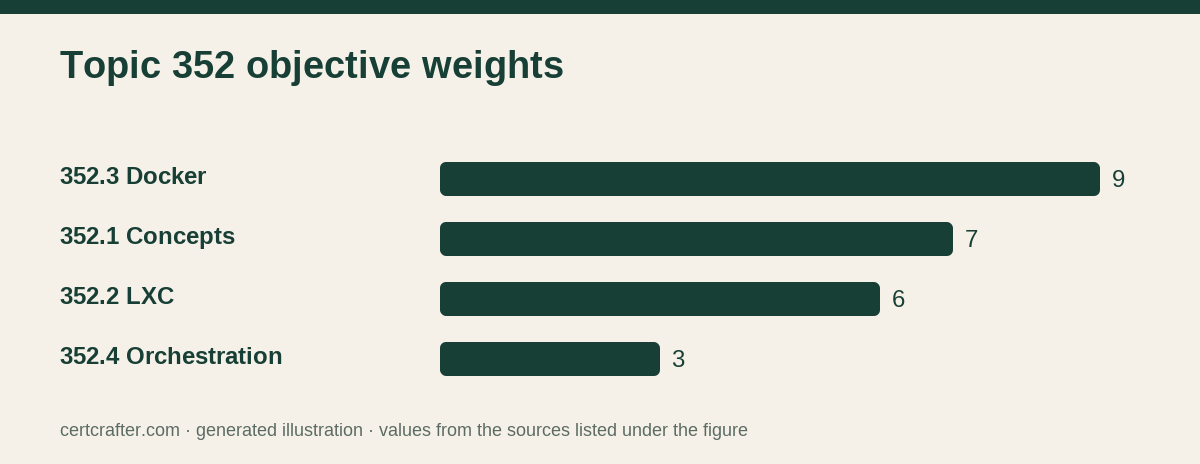
LPI splits the 305-300 exam into three topics. Container Virtualization is Topic 352, with four objectives.
| Objective | Weight |
|---|---|
| 352.1 Container Virtualization Concepts | 7 |
| 352.2 LXC | 6 |
| 352.3 Docker | 9 |
| 352.4 Container Orchestration Platforms | 3 |
They add up to 25. Full Virtualization also holds 25 and VM Deployment and Provisioning holds 10, so the weights total 60, the same as the number of questions. LPI states that objectives with higher weights are covered by more questions. It publishes no count per objective, so read the weights as proportion, not a promise.
 LPIC-3 305 — Three virtualization terms the exam expects you to keep separate. Watch on YouTube · CertCrafter
The channel has a short clip on terms the exam expects you to keep apart: LPIC-3 305, three virtualization terms.
How does a container actually work on Linux?
A container is not a small virtual machine. It is a normal process on the host kernel, wrapped in kernel features that limit what it sees, what it can use and what it may do. Objective 352.1 names them: namespaces, control groups, capabilities, seccomp, and a mandatory access control system such as SELinux or AppArmor.
Namespaces give the process its own view of things like process IDs and network interfaces. Control groups cap resources. Capabilities split root’s power into pieces so a container can hold only a few. Seccomp filters system calls. LPI asks you to understand how both LXC and Docker lean on all of these.
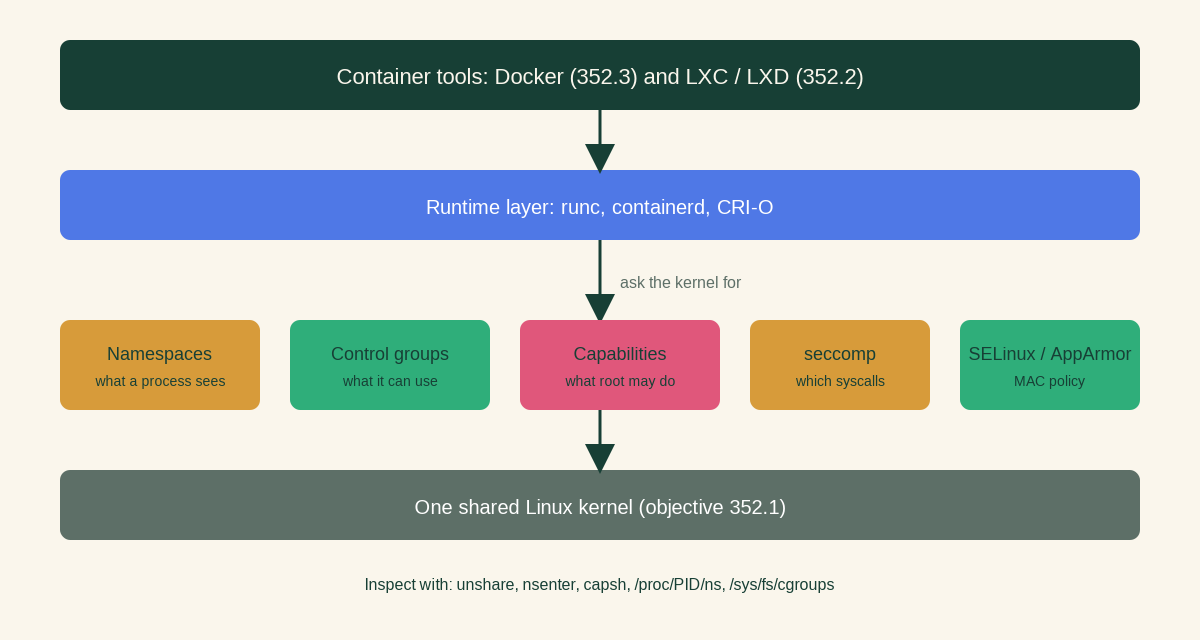
The same objective also expects you to understand the principle of runc, containerd and CRI-O, and to be aware of the OCI runtime and image specifications and the Kubernetes Container Runtime Interface. Podman, buildah and skopeo appear as awareness items. Awareness means you recognize the name and its job, not that you configure it.
Why does Docker carry the most weight?
Docker is the tool people meet first, and 352.3 is broad. LPI lists the architecture and components of Docker, running containers from images in a registry, managing images and volumes, logging, networking, writing Dockerfiles and running your own registry from the registry image.
The files and tools named are plain ones: dockerd, /etc/docker/daemon.json, /var/lib/docker/ and the docker command. That is a hint about the style. You are expected to know where a setting lives, not only what it does.
How do administrators use these skills on real systems?
On a build host, a team writes a Dockerfile, builds an image, pushes it to a registry and pulls it on a runner. When a container misbehaves, the first question is rarely about Docker itself. It is whether the container hit a memory limit, lost a capability it needed, or was blocked by a security profile. Those are the 352.1 topics showing up in an incident.
LXC and LXD sit at the other end. LPI describes LXC as system containers, which behave more like a whole machine than a single application. The objective covers LXD architecture, managing containers from existing images, networking and storage, container properties, resource limits and LXD profiles. A platform team might use profiles to give every container the same network and disk settings without editing each one.
Orchestration is the lightest objective at 3. LPI asks you to understand why orchestration matters and the key concepts of Docker Compose, Docker Swarm, Kubernetes and Helm. OpenShift, Rancher and Mesosphere DC/OS are awareness items. You will not be asked to run a cluster, but you will be asked what problem each tool solves.
Worked example: seeing a namespace for yourself
The utilities LPI lists for 352.1 include unshare, nsenter and /proc/[0-9]+/ns. They let you prove a namespace exists without Docker at all.
- On a test host, look at the links in /proc/self/ns. Each entry is a namespace the current shell belongs to. Note the identifiers.
- Start a new shell with unshare, asking for a fresh namespace of one kind, such as the UTS or mount type.
- In that new shell, list /proc/self/ns again. The identifier for the namespace you requested is different. The others match the host.
- From a second terminal, use nsenter with the new shell’s process ID to join the same namespace and confirm you see what it sees.
Three minutes of this teaches more than a page of definitions. A question that asks which tool starts a process in a new namespace, or which path shows a process’s namespaces, is then easy.
The LPIC-3 305-300 Complete Exam Kit works more of these under a timed 90-minute limit, with every answer explained.
Where do candidates lose marks in Topic 352?
The exam mixes multiple choice with fill-in-the-blank items, where you type a command or an option. Recognizing docker is easy. Reproducing the exact subcommand, flag or file path from memory is the hard part.
The first slip is treating containers as small virtual machines. A question describes isolation or a resource limit and asks which kernel feature provides it. If you cannot separate namespaces from control groups, you will guess.
The second is skipping 352.1 because Docker feels more useful. Concepts carries a weight of 7, higher than LXC, and it is the layer that explains everything else.
The third is neglecting LXC. At weight 6 it is nearly as large as concepts, and its tooling, LXD and profiles, differs from Docker’s. Candidates who practiced only Docker find it unfamiliar.
The fourth is waving off orchestration. Three weight points is small, yet the questions are about concepts, so they are cheap marks if you read the objective.
What should you do next?
Run the unshare exercise, then start a container and find its processes in the host’s namespace listing. Set a memory limit and read the matching control group file.
Then read the certification guide. The free sample shows how questions are framed, and the LPIC-3 305 hub lists every topic post, including Full Virtualization and common mistakes. LPI’s own objectives page has the full key knowledge list.
Comments
Comments are read by a person before they appear. How we moderate.