
Microsoft has published two versions of the MB-330 skills measured on the same study guide page, and which one applies to you depends on a single date: October 21, 2026. That is the day the English version of the exam switches to the new list. This guide walks through what Microsoft’s own change log says moved, what stayed put, and how to turn that into a study decision rather than a worry.
Nothing here is guesswork. Every statement about the update comes from the Microsoft Learn study guide for MB-330, which was last updated on September 21, 2026, and from the exam detail page. Where Microsoft has not said something, this guide says so rather than filling the gap.
What exactly changes in MB-330 on October 21, 2026?
Less than many candidates fear. Microsoft’s change log is a three-column table: the skill area before October 21, the skill area as of October 21, and the extent of the change. Here is the table as it stands on the study guide.
| Skill area | Extent of change |
|---|---|
| Audience profile | Minor |
| Implement inventory and asset management | No change |
| Manage and process inventory activities | Minor |
| Implement and manage supply chain processes | No change |
| Implement landed cost | Minor |
| Implement common sales and marketing features | Minor |
| Implement warehouse management and transportation management | No change |
| Perform warehouse management processes | Minor |
| Implement master planning | No change |
| Manage master plans | Minor |
Three things stand out.
First, every top-level functional group that appears in the table is marked no change. The edits sit one level down, in individual objective groups.
Second, nothing is marked major. The strongest label Microsoft uses anywhere in the table is minor.
Third, the product information management area does not appear in the table at all. It is still the largest area on the exam at 25-30%, and its objectives are listed in full in the current skills measured, but none of them is flagged as having changed.
Microsoft does not itemize the wording changes inside each minor row. The table tells you which objective group was touched, not which bullet. The practical response is to read the current bullets for each flagged group, which the next sections lay out, and to compare them against whatever notes you already hold.
 MB-330 — What MB-330 changes on a D365 consultant's CV. Watch on YouTube · CertCrafter
 Did the MB-330 domain weights change?
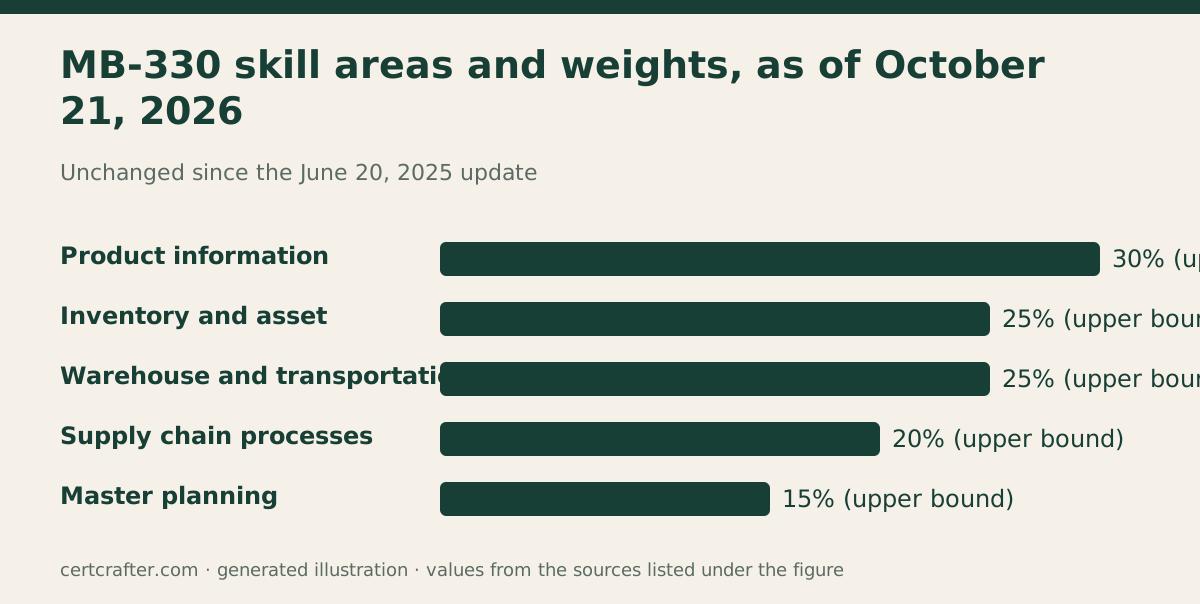
No. The skills at a glance for the version as of October 21, 2026 read:
- Implement product information management, 25-30%
- Implement inventory and asset management, 20-25%
- Implement and manage supply chain processes, 15-20%
- Implement warehouse management and transportation management, 20-25%
- Implement master planning, 10-15%
Those are the same five areas and the same weights that have applied since the June 20, 2025 update, which is the version the MB-330 practice test bundle was built against. The June 2025 change was the substantive one for recent candidates: it reweighted the areas and added a whole Warehouse Management mobile app subsection. October 2026 is a tidy-up by comparison.
That matters for how you spend your time. If your plan already allocates the most hours to product information management and costing, then inventory and assets, then warehouse and transportation, you do not need to redraw it. The MB-330 guide has a phased plan on exactly that shape.
Which objective groups were flagged, and what do they cover now?
Here are the current bullets for each of the five objective groups marked minor. Treat these as your checklist: if a bullet names a feature you have never configured, that is where a stale study set is most likely to let you down.
Manage and process inventory activities (inside inventory and asset management):
- Create and process journals, including BOM, item arrival, transfer, movement, inventory adjustment and counting journals
- Create and process transfer orders
- Configure and manage the inventory closing and adjustment process
- Apply and remove inventory blocking manually
- Create batch disposition codes
- Configure and run inventory reports, including ABC classification
Implement landed cost (inside supply chain processes):
- Configure landed cost parameters and voyage statuses
- Create and process voyages with purchase orders or transfer orders
- Configure cost estimations, the tracking control center, over and under tolerance setup, and journey templates
- Configure cost type codes and auto costs
- Track inbound voyages and shipping container journeys
Implement common sales and marketing features (inside supply chain processes):
- Create and maintain customers
- Configure sales agreements
- Configure and process sales quotations, sales orders, reservations and sales returns
- Configure sales groups and commissions
- Configure and process intercompany orders
- Configure and process customer rebates
- Configure and manage delivery schedules, available-to-promise (ATP) and capable-to-promise (CTP)
- Configure and use product bundles
Perform warehouse management processes (inside warehouse and transportation management):
- Configure and process replenishment
- Manage inbound and outbound load planning workbenches
- Configure and process inventory movements via warehouse work
- Create cycle counting work and perform cycle counting
- Process inbound and outbound orders by using the Warehouse Management mobile app
- Configure containerization and packaging options
- Configure and process cross docking
Manage master plans (inside master planning):
- Run Planning Optimization and analyze the results
- Evaluate and process planned purchase and transfer orders
- Set up and use the Supply schedule page
- Configure safety margins
- Configure and process safety stock journals
Two of the free sample questions shown below this article sit squarely inside flagged groups. One asks which object exposes sales order picking work on the Warehouse Management mobile app. The other asks which safety margin schedules a planned receipt ahead of the demand date. Neither is harder because of the update, but both test the kind of configuration detail that a minor wording change tends to sharpen.
What about the audience profile and Copilot?
The audience profile is the paragraph at the top of the skills measured describing who the exam is for. It is flagged minor. The current version lists the feature areas a candidate is expected to know, and that list ends with Copilot in Dynamics 365 Supply Chain Management.
Do not read that as Copilot arriving on October 21. The exam detail page, which shows a last-updated date of June 20, 2025, already names Copilot in Dynamics 365 Supply Chain Management in its role overview. Copilot has been in the profile since the previous version. What exactly was reworded in the profile is not spelled out in the change log.
One line from the study guide is worth keeping in view regardless of version: most questions cover features that are generally available, and the exam may include Preview features if they are commonly used. The bullets under each skill illustrate how a skill is assessed, and related topics may still be covered.
Worked example: deciding which version you will sit
Follow these steps with your own booking.
- Find your exam date and language. MB-330 is scheduled through Pearson VUE and is offered in English and Japanese.
- Compare the date with October 21, 2026. If you sit the English exam before that date, the earlier skills measured apply. On or after it, the current list applies.
- Adjust for language. Microsoft updates the English exam first and localizes other languages approximately eight weeks after the English update. A Japanese sitting in the weeks following October 21 may therefore still follow the earlier list. If your preferred language is not available, you can request an additional 30 minutes.
- Check the flagged groups against your notes. Take the five lists above and tick off every bullet you can configure from memory. Anything you cannot is a study item whichever version you sit, because the top-level areas and weights did not move.
- Leave the rest of your plan alone. The weights are unchanged, so the sequence of your study phases does not need to change.
Example: a candidate booked for the English exam in late October has crossed the line and should prepare to the current list. A candidate booked for the Japanese exam the same week should check the study guide for their language close to the date, and prepare to the current list if there is any doubt, because the differences are marked minor and preparing to the newer list costs nothing extra.
Does anything else about the exam change?
Not according to the pages Microsoft publishes. The facts that candidates most often ask about are the same on both sides of October 21:
- Passing score: 700 or greater, on a scaled 1 to 1000 scale, not a percentage.
- Time: 100 minutes to complete the assessment.
- Question count: not published for this exam. Microsoft states that most of its certification exams contain 40 to 60 questions.
- Format: proctored, and it may include interactive components.
- Retakes: if you fail, you can retake 24 hours after the first attempt, with longer waits for later retakes.
- Renewal: the certification expires unless renewed. Renewal is a free online assessment on Microsoft Learn, on a 12 month cycle.
Microsoft also recommends registering with a personal account rather than an organizational work or school account, because exam records tied to an organizational account are lost if you leave that organization.
How should you study for the October 2026 version?
Three traps are specific to a skills update of this size.
Trap one: over-reacting. A minor flag on five objective groups is not a reason to abandon material written to the June 2025 list. The areas and weights are identical. Rewrite your checklist for the flagged groups and move on.
Trap two: under-reacting on the mobile app. Perform warehouse management processes is flagged minor, and it is the group that holds the Warehouse Management mobile app bullet. There is also a separate objective group, Implement the Warehouse Management mobile app, covering device menus, menu items, display settings, detours, installation and warehouse workers. If your study material predates June 2025 it misses all of that, and a minor tweak in October does not rescue it.
Trap three: assuming the change log lists every edit. It lists objective groups, not bullets. Read the current bullets in full at least once.
Then test the result. Take the free MB-330 sample quiz to see how configuration-level questions in these groups are written. When you can clear the flagged lists from memory, move to full-length timed sets: the bundle on the MB-330 practice tests page covers all five areas under the same weights the exam will use on October 21. For dates, pass mark and a phased plan in one place, use the MB-330 guide, and for other posts on this exam see the MB-330 hub.
The study guide itself remains the source to read before you book. Microsoft updates it periodically, and this article reflects the version dated September 21, 2026.